This was a project that was born out of sheer frustration. In the early days of phones on the mesh network, we wanted to have a feature where a weather forecast could be heard by dialing an extension on an Asterisk PBX. It was discovered that we could launch a custom application for Music on Hold, so we used and RTL-SDR dongle and GNU radio to tune to a local weather station. To access it we could make an extension auto-answer and go on hold, hence you would get the forecast. It worked in principle.
Now enter the frustration part. It seems that Asterisk wants to poll an application periodically to see if it was still alive, and of course GNU radio was not equipped for this, so it started to generate a plethora of error messages that were viewed on the console, obscuring ‘real’ error messages and making issues difficult to debug. There had to be a better way.
The answer was to build an autonomous device that could register as an extension to the PBX, and playback the audio when required. It was decided to use a Raspberry Pi for this purpose, as we could continue with the same dongle as before, and also use the same GNU radio software. The Pi Weather (Wx) Receiver (Rx) was born!
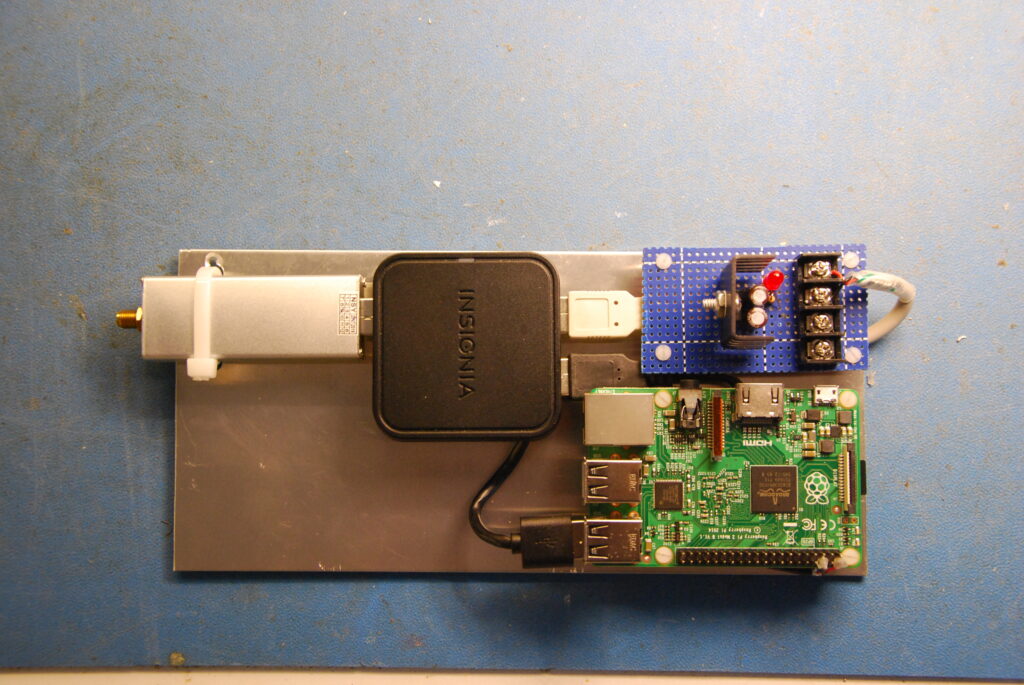
The hardware was relatively simple and available off the shelf. An external power supply was built so that it could accommodate the existing 12v power supply, and it was discovered that the current draw by the dongle was causing the USB power to droop, so an external hub was used that was powered by the same supply. Later the linear regulator was replaced with a switching version.
Building the software was the next challenge. First, we needed to have a SIP client that would register with the PBX and recognize an incoming call. Next, we needed to code the audio samples into a format that Asterisk would understand, and send them to the PBX using RTP, the real time protocol.
It was decided to write the SIP Client in the Java language, as there was a lot of support already available for it, including tutorials online. Using that, and the asterisk manual, it soon was registering with the PBX and could receive calls. Next, we had to transcode the audio into G711 u-Law or A-law format, depending on what asterisk was demanding. The real-time aspects were written in the C language for performance reasons, and the interface between the two layers used the Java Native Interface (JNI). A block diagram of the software is shown below.
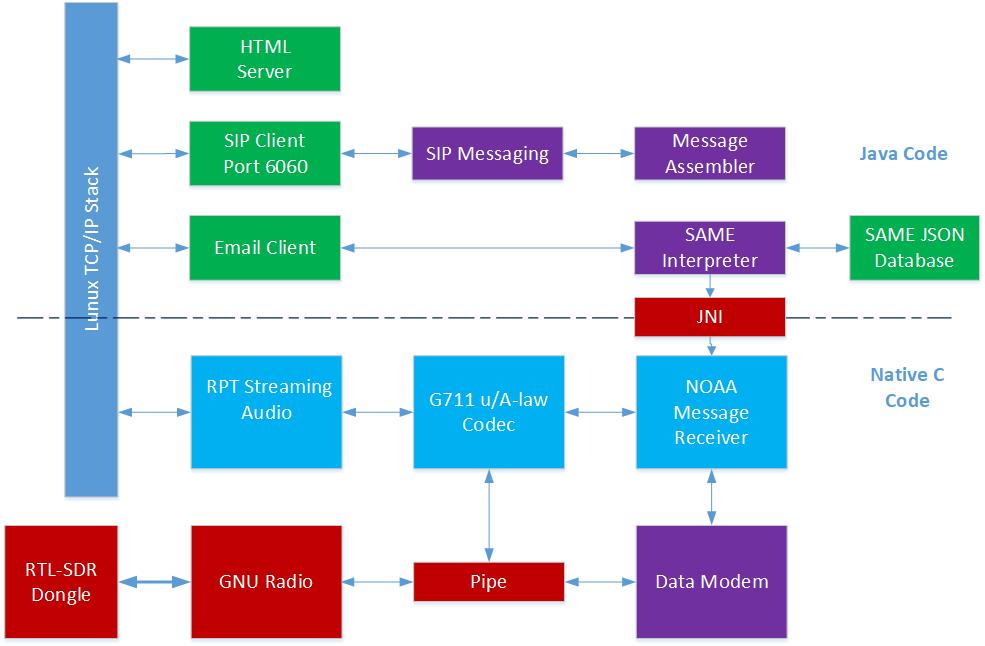
After getting the basics of the audio working, the next task was to add a SAME (Selective Area Message Encoding) decoder. The messages are sent in ASCII using FSK, but using a unique encoding scheme that uses tones that are not commonly used in the industry. The demodulator was built using a proprietary algorithm, which over the years has proven to be robust. The messages are decoded using entries in a JSON database, which varies between installations.
Three more additions were made at the Java layer, an HTML server, SIP Messaging and E-mail Client. The HTML client shows the current operating status of the receiver and the configuration parameters and the other two are used to forward the messages, either using SIP messaging as a transport to send the ‘raw’ message to another instance of the software for further decoding, or decode the message and forward it as an e-mail message.
The next issue was what to do with the messages when we get them. One approach was to post them to a SQL database on a remote web site, where they could be decoded and sent to interested parties. This was abandoned when the hosting space was no longer available.
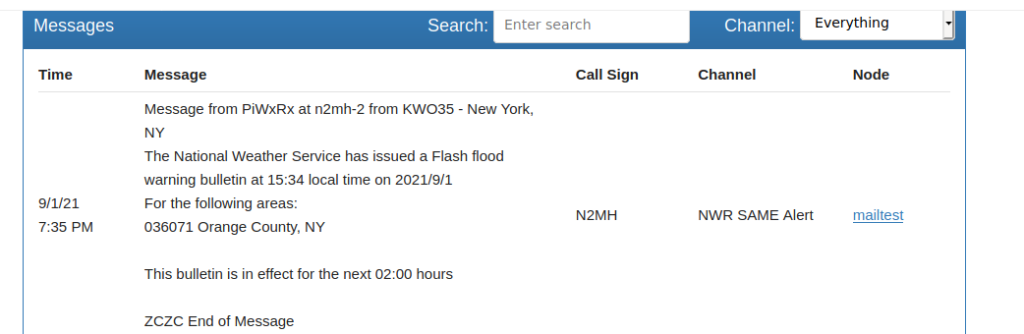
As there are several of these in the US and Canada, it was decided to set up a central repository for all messages. Using the built in e-mail capability, the received messages are decoded at the receiver and send by e-mail to a central database, where they are posted to a chat service on the mesh network. Any mesh user is able to view any of the warnings and broadcasts, and select those just in their local area.
Below is an example of an interpreted message that was automatically placed in a chat room by the software, from N2MH in New Jersey.
It works well and is used by many amateurs on the AREDN network. That is, of course, unless Environment Canada decides to abandon the service, which we hope will not happen.
The code for this project can be found on GitHub, at https://github.com/ve6vh/piwxrx. Please download the manual and read it first before attempting to install it, as the process is quite complicated.
You can also join a discussion forum at PiWxRx@groups.io, or send and e-mail to PiWxRx+subscribe@groups.io to subscribe. Please limit your posts on the forum to topics that may be of interest to other users. If you are having difficulties, please contact me directly using the contact page. 73.